Email whitelisting is the process of adding an email address to your address book or another approved sender list. This assures that emails from that address aren’t sent to the spam folder. When you whitelist an email address, you're telling your email client that you trust the sender and explicitly want to see the messages in your inbox.
Whitelisting will help you make sure that the time and effort you're putting into creating effective email marketing campaigns don’t go to waste. Being familiar with the best practices we’re sharing in this email whitelisting guide is useful to both marketers and subscribers.
How do you whitelist?
Whitelisting is a quick, one-time-only task to ensure the sender of an email gets added to the recipient’s address book or safe senders list.Usually, all you need to do is open an email message and verify the sender can be trusted:
Here are simple instructions on how to ensure that future emails get delivered straight to the inbox, in some of the most popular email clients:
Apple Mail Whitelisting (OS X and iOS devices)
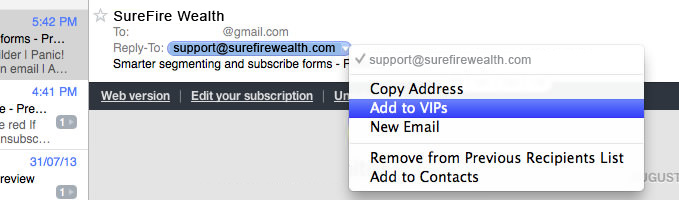
Both Apple Mail on OSX and Mail on iOS devices have a similar process for adding senders to Contacts. By selecting the From, or Reply-to on an email message, you can choose to "Add to Contacts" or "Add to VIPs."
The advantage of “Add to VIPs” is that future emails from this sender will be added to a special VIP mailbox in iOS Mail.
Outlook 20XX Whitelisting
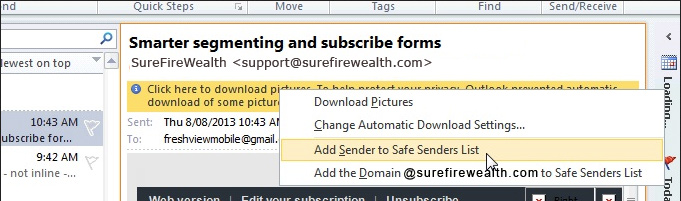
When opening an email from a sender, an alert at the header of the message, "Click here to download pictures..." should display. Click this and select, "Add Sender to Safe Senders list:"
Outlook.com Whitelisting
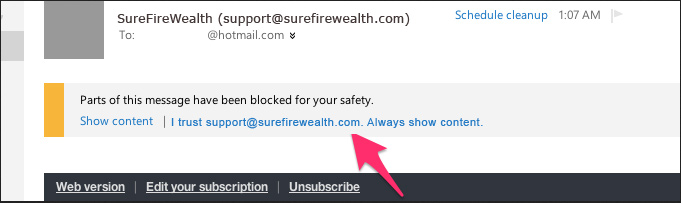
After opening an email message, an alert message should display with, "Parts of this message have been blocked for your safety." Beneath this, click the link with, "I trust sender@theirdomain.com. Always show content:"
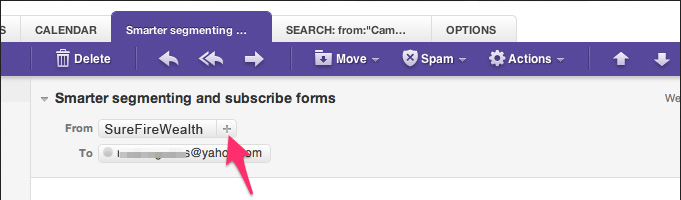
Yahoo! Mail Whitelisting
When opening an email message, a "+" symbol should display next to From: and the sender's name. Select this and an "Add to contacts" pop-up should appear. Select "Save:"
Gmail Whitelisting (Webmail and mobile)
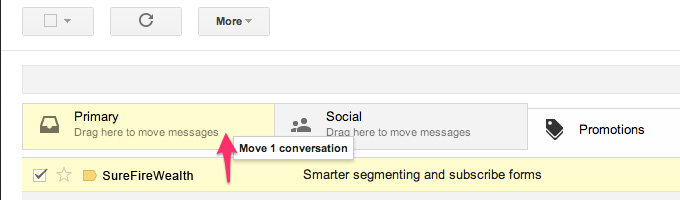
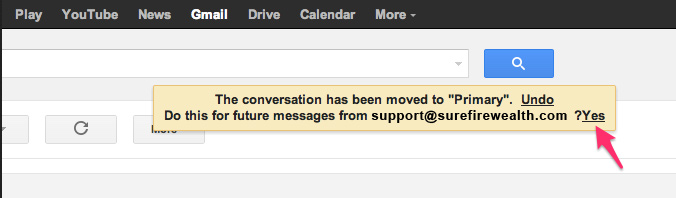
Getting all future emails from a sender to appear in the “Primary” tab (instead of "Promotions", or elsewhere) is a quick, two-step process.
First of all, drag-and-drop the email message from beneath the tab it’s currently filed under, to the "Primary" tab:
Gmail on mobile devices doesn’t provide a way to prioritize messages. However, touching "Show images" then "Always show images from Sender" will ensure that images always display in the inbox:
Android Whitelisting (Default client)
On Android devices, open the email message and touch the picture of the sender that displays before the message. Tap "Add to Contacts."
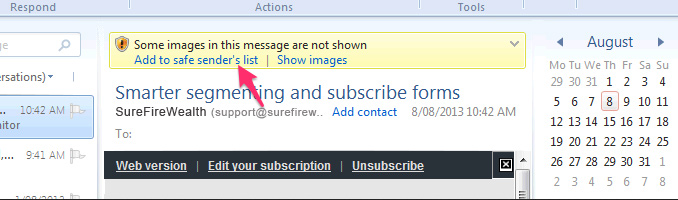
Windows Live Desktop Whitelisting
AOL Mail Whitelisting
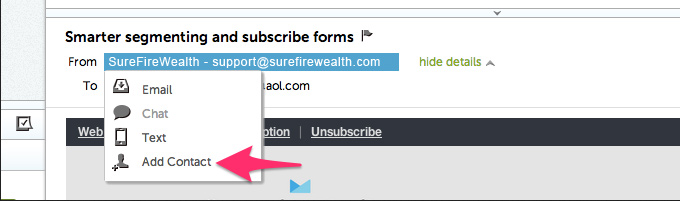
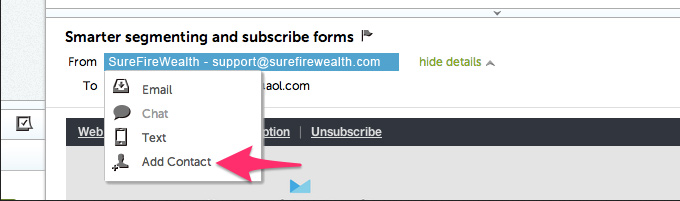
In the preview pane for an opened email message in AOL Mail, select the sender’s From name under the email’s subject line and select "Add Contact" from the drop-down menu:
In a digital world bursting with attention-grabbing headlines and fleeting trends, one marketing strategy has consistently proven its worth: email marketing. While you may have come across numerous articles proclaiming the death of email, it's time to debunk that myth and uncover the untapped potential that lies within this tried-and-true method. Join us on a journey […]
Are you looking for a fun and easy way to earn extra money from home? Look no further than affiliate marketing! Not sure if it is for you? Read on to learn some of the basics... Affiliate marketing is a type of online advertising that allows you to promote other people's products and earn a commission […]
Are you looking for new ways to grow your email list? Do you want tips to stand out from the competition and establish your reputation as an authority in your industry? Well, read on... Building strong bonds with your subscribers and getting them to hang on your every word is the key to success in today’s competitive digital landscape. […]
Copyright 2026, SureFireWealth Inc. and SureFireWealth.com All Rights Reserved
ALL TRADEMARKS AND LOGOS ARE THE PROPERTY OF THEIR RESPECTIVE OWNERS. THIS SITE AND THE PRODUCTS/SERVICES OFFERED ARE NOT ASSOCIATED, AFFILIATED, ENDORSED OR SPONSORED BY ANY BUSINESS LISTED ON THIS PAGE NOR HAVE THEY BEEN REVIEWED TESTED OR CERTIFIED BY ANY OTHER COMPANY LISTED ON THIS PAGE.
All files and information contained in this Website or Blog are copyright by SureFireWealth Inc., and may not be duplicated, copied, modified or adapted, in any way without our written permission. Our Website or Blog may contain our service marks or trademarks as well as those of our affiliates or other companies, in the form of words, graphics, and logos. Your use of our Website, Blog or Services does not constitute any right or license for you to use our service marks or trademarks, without the prior written permission of SureFire Wealth, Inc. Our Content, as found within our Website, Blog and Services, is protected under United States and foreign copyrights. The copying, redistribution, use or publication by you of any such Content, is strictly prohibited. Your use of our Website and Services does not grant you any ownership rights to our Content.